

SEO
Most Effective SEO Title Tag Formulas for 2026
Search has changed dramatically. Google AI Overviews, conversational search, and generative engines are transforming how users discover information....
Read More
Imagine putting in effort to make great, SEO-friendly content, then realizing your own pages are competing for the same search terms. This frustrating scenario is known as keyword cannibalization. It happens when several pages on your website aim for the same keyword and search intent. This confuses search engines and can hurt your site’s performance.
When keyword cannibalisation occurs, search engine bots have a hard time determining which page best fits a query. This can cause your best content to go unnoticed. Visitors might end up on less relevant pages, which can lower your search rankings and conversion rates.
We’ll explore why this issue is detrimental to your SEO, how to identify it, and most importantly, how to fix and prevent it.
Keyword cannibalization occurs when multiple pages on a website compete for the same keyword or search intent. These pages don’t work together; they compete in search results. So your own content ends up as a rival.
Think of it like fielding two candidates from the same party in a single-seat election. Both split the votes, and neither wins decisively. In SEO, Google decides which of your pages best fits the query. If it can’t make a clear choice, it may rank both pages lower than they deserve.

This typically occurs when a website:
Cannibalization isn’t always obvious. Two pages may seem to target different keywords, but they can meet the same user intent. From Google’s view, this means they address the same issue.
Left unaddressed, keyword cannibalization quietly erodes your search performance in several ways.
The good news: keyword cannibalization is fixable. Once you identify the issue, you can fix it. Use consolidation, canonical tags, redirects, or clear content differences. These methods help your pages work together instead of competing.
Keyword cannibalization occurs when several pages on your site target the same search query. This splits authority and confuses search engines about which page to rank. Here are two of the most common scenarios where this plays out.
Editorial sites often accumulate this problem over time. A team publishes a post on “best running shoes for beginners” in 2021. Then, they created a “top running shoes guide” in 2023. Finally, they add a roundup called “running shoe buying guide.” Each targets a similar goal, so Google must decide which one gets the top spot. Often, it rotates between them or ranks none well.
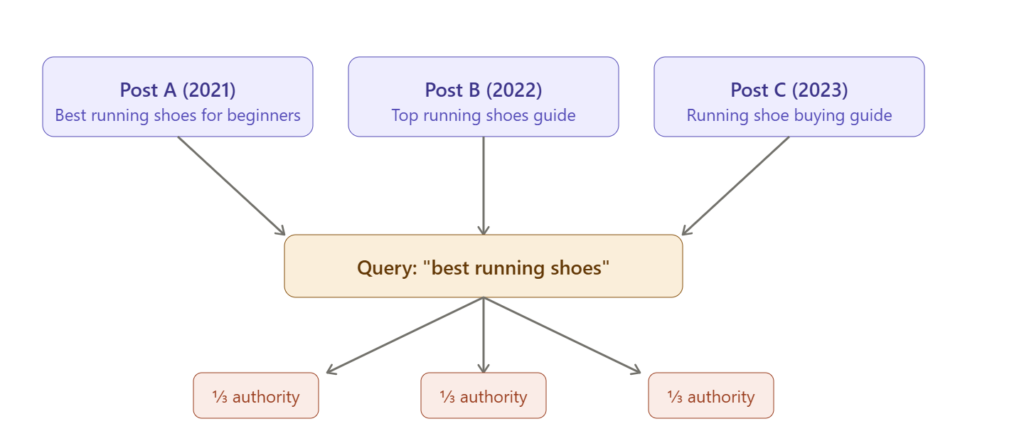
The solution is simple: consolidate. Choose the strongest post, redirect the others to it, and combine any unique value from the weaker posts into the main one.
Online stores run into a different version of the same problem. A “women’s boots” category page and a product page for “leather ankle boots” compete for attention. The category page should target broad, high-volume terms. The product page should focus on specific, long-tail terms. When the targeting overlaps, neither ranks as well as it could.
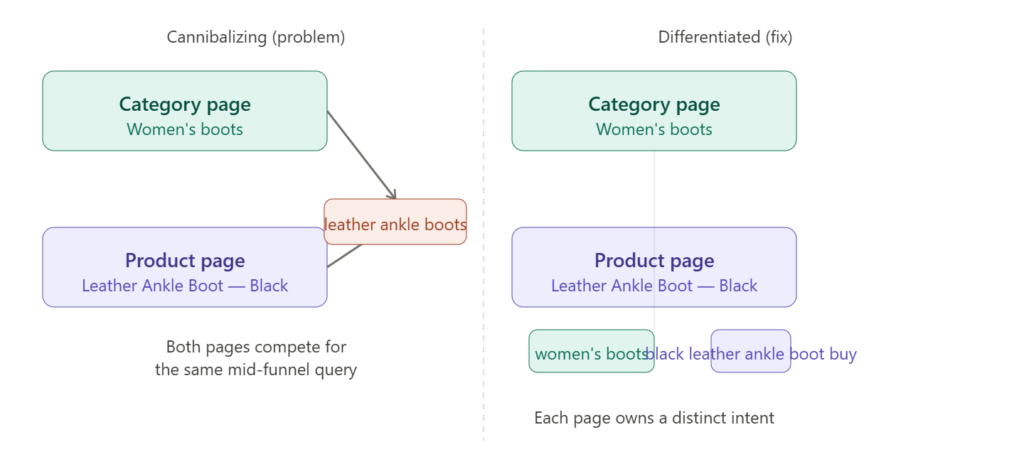
The solution is intent mapping. Category pages should focus on broad queries like “women’s boots.” Product pages should target specific, buy-intent terms such as “black leather ankle boot size 8.” Clear separation means each page sends a stronger, unambiguous signal to search engines.
Keyword cannibalization occurs when several pages on your site target the same keyword. This splits authority and confuses search engines about which page should rank.
GSC is the most reliable free method since it shows you actual ranking data directly from Google.
Step 1: Run a query filter. Go to Performance → Search Results. Click + New and filter by a specific query, like “content marketing.” GSC will show every URL on your site ranking for that term.
Step 2: Check for several URLs with the same query. Stay on the Pages tab and keep your query filter on. If you see 2+ different URLs appearing for the same keyword, that’s a cannibalization signal.
Step 3: Check the Clicks/Impressions split. If two pages share impressions for the same query—like 60/40 or 50/50—neither page holds full authority. A healthy pattern is one dominant page capturing the bulk of impressions.
Step 4: Use the date comparison feature. Compare two time periods to see rank changes. If your ranking URL keeps switching between two pages, cannibalization is likely the cause.
Key sign of cannibalization in GSC: A keyword has high impressions but low clicks. Also, the ranking URL changes often in reports.
Use the site: operator directly in Google:
site:yourwebsite.com “target keyword”
If Google shows 2 or more different pages for your query, you probably have a cannibalization issue. You can also try:
site:yourwebsite.com intitle:”keyword”
It shows pages where the keyword is in the title tag. This is the clearest sign of intentional optimization overlap.
To fix cannibalized keywords, you can:
Keyword cannibalization rarely happens by design. It usually stems from three main problems: fragmented content planning, unintentional content overlap, or overly aggressive on-page SEO.
Most keyword cannibalization problems trace back to a lack of strategic content planning. When different teams or writers publish content on their own, they often overlap. This happens because they don’t see what others have done. As a result, similar topics get covered again and again.
Common planning failures include:
Good content keyword strategies can still cause cannibalization if you don’t know what’s published. You need to check which keywords those pages use.
Similar topics handled in the same way can still cause cannibalization, even if the content isn’t identical. Search engines look at content as a whole. If two pages discuss the same topic similarly, they will compete. This is true even if the text isn’t unique.
Typical scenarios include:
The result is that Google must make a judgment call about which page to surface — and it may choose inconsistently, rotate between pages, or rank neither as highly as a single consolidated page would rank.
Aggressive keyword optimization can inadvertently pull unrelated pages into competition. When site-wide elements like navigation labels, footers, sidebar links, and template headings are filled with a target keyword, it can confuse search signals. This affects pages that weren’t meant to rank for that term.
Over-optimization patterns that cause cannibalization:
To fix keyword cannibalization, first, find the pages that compete. Then, choose the best solution based on their relationship. There are three primary solutions: consolidation, technical signals, and improved internal linking.
When two or more pages cover the same topic well, it’s best to merge them. This creates a stronger, more authoritative resource. Consolidation combines link equity, topical signals, and engagement metrics into one URL. This often leads to a big boost in ranking for the page that remains.
How to consolidate effectively:
When pages need to stay live for users or business, but shouldn’t compete in search, use technical signals. These signals tell search engines which version to prioritize.
Important: Canonical tags are a hint, not a directive. If the non-canonical page receives significant backlinks or engagement, Google may ignore the tag. In those cases, a 301 redirect is the stronger solution.
Internal linking is one of the most underused signals for resolving cannibalization. Linking to your preferred page with keyword-rich anchor text helps search engines. Avoid linking to competing pages with the same anchors. This way, search engines know which URL to rank for a specific query.
Internal linking best practices for resolving cannibalization:
Fixing cannibalization after the fact is costly and time-consuming. The most effective approach is building systems that prevent it from occurring. Two practices are central: keyword mapping and regular content audits.
A keyword map is a document that links target keywords to specific pages on your site. This way, each keyword has one clear owner. It becomes the single source of truth for your entire content team.
Building an effective keyword map:
A keyword map doesn’t have to be complex. A simple spreadsheet works well. Just include the URL, primary keyword, secondary keywords, and the last-reviewed date. This is enough for most sites.
Even with a keyword map in place, cannibalization can creep in over time — especially as content is updated, repurposed, or expanded. Regular content audits catch these issues before they compound.
A practical content audit cadence:
Tools like Screaming Frog, Ahrefs Site Audit, Semrush’s Position Tracking, and Google Search Console can quickly spot cannibalization signals. They work well at scale.
Keyword cannibalization is a structural problem that gradually worsens over time. Ignoring this weakens the authority of key pages. It confuses search engines and creates a disjointed user experience. The good news is that it’s both fixable and preventable with the right systems.
Start with a diagnostic: map your existing URLs to their keywords and identify where competition exists.
Apply the right remedy:
Investing in a well-kept keyword map and regular audits will prevent cannibalization from coming back. The sites that rank well don’t always have the most content. Instead, they shine because each page has a clear, unique purpose.
Keyword cannibalization happens when two or more pages on your website compete for the same search keyword. You might have one strong page, but instead, you get several weaker ones. This splits search engine attention, so none rank as high as they could.
Search Google for “site:yourdomain.com keyword” and check whether multiple pages appear. You can use Google Search Console (Performance > Queries) to filter for a target keyword. Check the Pages tab. If you see more than one URL with impressions for the same query, you likely have cannibalization.
Not necessarily. Pages on the same topic can exist together without competing. This works if they meet different search intents. A product page aimed at a commercial keyword can rank alongside a blog post targeting an informational version of that keyword. They rank for different queries and don’t compete.
Not always. Consolidation is often better than deletion. Merging content and redirecting keeps the link equity from the removed URL. If the page has no backlinks, traffic, or unique value, deletion with a redirect is fine. If it has accumulated authority, merge its content into the winner before redirecting.
Timeline varies by site size and crawl frequency. Small to medium sites often see changes reflected in rankings within two to six weeks of Google recrawling the affected URLs. Larger sites or those in competitive niches may take two to three months. You can speed up the process by submitting affected URLs for recrawling via Google Search Console.
Search has changed dramatically. Google AI Overviews, conversational search, and generative engines are transforming how users discover information....
Read MoreFor more than a decade, marketers have repeatedly claimed that SEO is dead in 2026. Every major Google...
Read MoreSearch engine optimization has changed dramatically over the last few years. In 2026, SEO writing is no longer...
Read More